
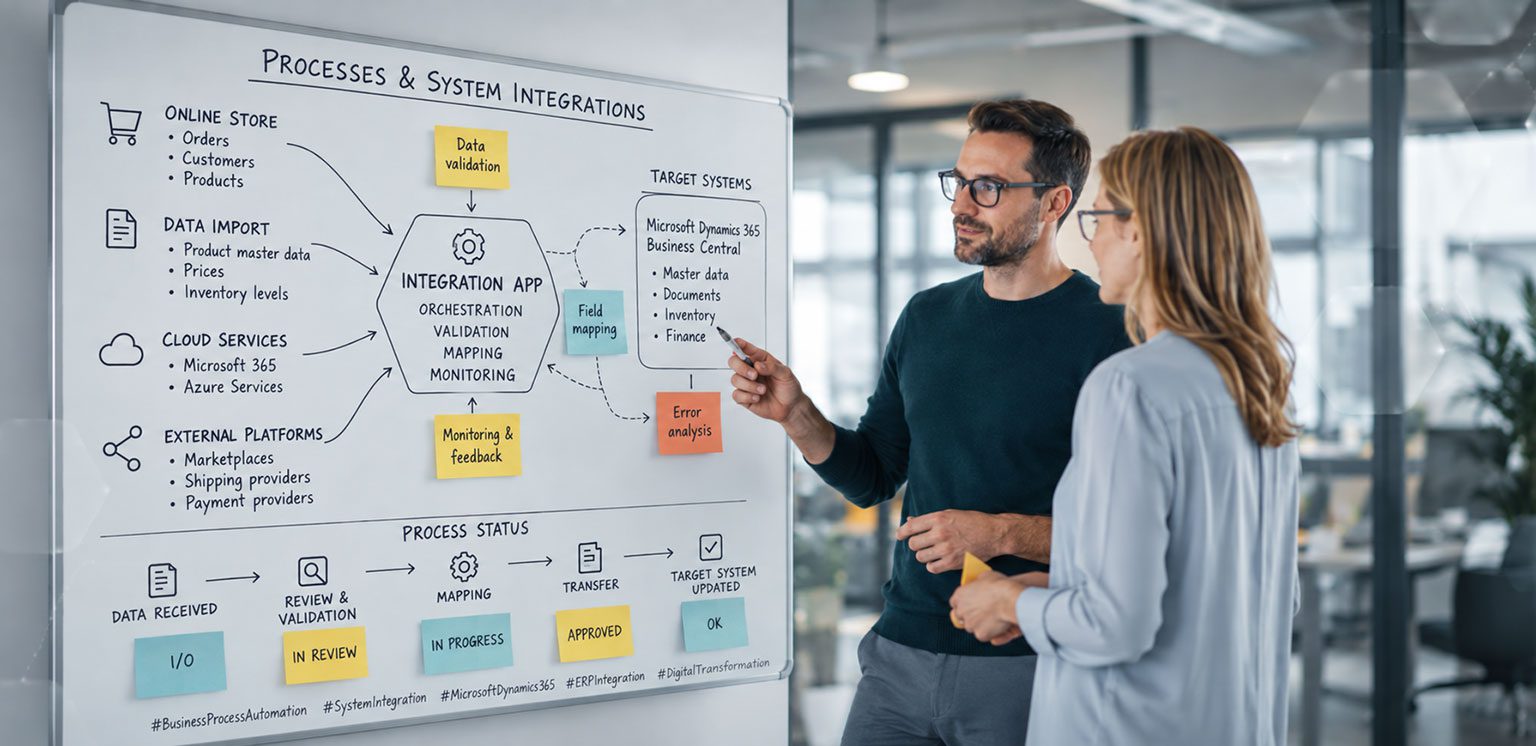
Anyone who works on ERP projects will inevitably encounter one topic: integrations. Whether it is a webshop, EDI, CRM, warehouse management, marketplaces or external platforms – sooner or later, systems need to communicate with each other. The OTE Interface App did not originate from some grand product idea, but from many small challenges I kept encountering in projects.
It Was Never Really Planned as an App
Anyone who has been through a few ERP projects will probably recognise the situation. At the beginning, you talk about Business Central, processes, master data and perhaps a few reports. Then, at some point, someone says:
“Oh, by the way, we also have a webshop.”
Shortly afterwards, you usually hear:
“We need EDI too.”
Then a CRM system gets added. Perhaps a logistics platform. Maybe a document management system. Or some application that has been doing its job reliably for the past ten years and, of course, still needs to be connected. And before you know it, you are right in the middle of integrations.
Looking back over the past few years, there has hardly been a project where this was not an issue. Sometimes it involved simple file imports. Sometimes complex API integrations. Sometimes we needed to transfer orders, sometimes products, prices, inventory or tracking information. The systems were different. The challenges were surprisingly often the same. Eventually, I had simply encountered the same problems too many times. Of course, over the years I looked at plenty of solutions available on the market. And, of course, there are good products out there. But I kept coming away with the same feeling. Almost every project had requirements that did not quite fit the structure of the existing solutions. Sometimes I wanted better traceability when errors occurred. Sometimes I needed more flexibility in how data was processed. Sometimes I wanted to set up integrations faster or monitor them more easily. So I started developing small tools to help. Nothing major. A component here. A function there. All I really wanted was to avoid solving the same problems from scratch every time. Over time, however, those small tools became more and more substantial. And at some point, I realised that they were gradually turning into a platform of their own.
The Real Work Begins After the First Successful Data Transfer
Getting an integration to work is usually not the difficult part. The real challenge begins afterwards. What happens after the next update? How do you find errors? How do you determine why a particular record was not processed? How do you make sure the integration will still work transparently and reliably a year from now? This is often where the difference between a quick solution and a good solution becomes apparent. Many integrations begin with a single requirement. A webshop needs to be connected. A few months later, additional systems are added. Suddenly, EDI messages need to be processed, a logistics provider needs to be connected or data needs to be made available for reporting. That is when it becomes clear just how important a structured approach is. And that is exactly why the Interface App has continued to grow over the years.
Modern ERP Projects Are Integration Projects
In the past, an ERP system could often operate largely on its own. Today, the reality is completely different. Particularly in projects involving food, wholesale, retail, e-commerce and logistics, I rarely encounter companies that work exclusively within a single system. Webshops, marketplaces, CRM systems, EDI platforms, payment providers, document management, warehouse management and data platforms have long since become part of everyday business. As a result, Microsoft Dynamics 365 Business Central is increasingly becoming the central platform where information comes together and processes are managed. That is why I no longer see integrations as an exception. They are an integral part of modern ERP architectures. And that is exactly why the OTE Interface App is now used in almost every new project. Not because I necessarily want to sell an app, but because I know how much time, effort and discussion it can save in day-to-day project work.
Why I Don’t Put an AI Label on Everything
There is currently no escaping AI. If you had to sum up the impression created over the past few months, you might almost think that every piece of software had simply been waiting for someone to add a Copilot or an agent to it. Don’t get me wrong. I find these developments incredibly interesting. I probably try out new technical possibilities faster than many others. But when it comes to integrations, I am still fairly conservative. If a customer sends an order, I do not want AI deciding whether that order should be transferred. I want it transferred. Full stop. If something goes wrong, I want to be able to understand why. That is exactly why I continue to rely on clear rules, transparent processes and traceable logic for the integration itself. I see AI more as a supporting tool. For analysis. Monitoring. Troubleshooting. Perhaps, in future, for setting up or documenting integrations. But not as a replacement for clean and reliable data exchange.
Perhaps that is actually one of the most important lessons from the current discussions around AI: not every process automatically becomes better just because you apply AI to it. Sometimes, the best solution is still to make a process as simple, transparent and robust as possible.
From Project Tool to Standard Solution
Looking back, I find it interesting to see how the app has evolved. Originally, I simply wanted to make my own projects more efficient. Today, the OTE Interface App is in production at several customers and has become one of our standard solutions in almost every new project. That is probably because it is not based on a theoretical product idea, but on many real-world projects. Every feature has solved a specific problem at some point. Every component was needed by a customer at some point. And that is why, to me, the app does not really feel like a product. It feels more like a toolbox that has grown over the years. When a new project starts today, the question is usually no longer whether integrations will be required.
The question is: Which systems need to be connected, and how can we make those integrations as simple, stable and maintainable as possible?
Stay Curious
The great thing about development is that it is never really finished. Every new customer brings new requirements. New systems, new processes and new ideas. And that is exactly what continues to make my job interesting. Many of the app’s features came about because I encountered a problem in a project and asked myself:
“Couldn’t this be easier?”
Sometimes that leads to small improvements. Sometimes to new features. And sometimes it develops into an entirely new component. That is why the OTE Interface App continues to evolve. Not on the basis of a theoretical product strategy, but on the basis of real experience from real projects. And I hope that remains the case in the future. Because it was precisely this combination of curiosity, experimentation and practical challenges that ultimately turned lots of small tools into an app of their own.
You can find more information about the OTE Interface App here:
OTE Interface App for Microsoft Dynamics 365 Business Central