
For reliable integrations
OTE Interface App for Business Central
Control integrations centrally. Exchange data reliably. Automate recurring tasks. Keep errors easy to trace.
Interface App for Business Central
One app. Multiple integrations. One central standard.
Anyone working on ERP projects knows the situation: integrations often grow step by step. A webshop gets connected, a supplier sends files, a customer requires EDI data, another system provides information via API.
Technically, many of these processes follow the same pattern. Data is imported or exported, validated, transformed, processed, and logged. Yet the underlying components are often rebuilt from scratch every time.
The OTE Interface App provides a centralized integration framework for Microsoft Dynamics 365 Business Central. It standardizes recurring processes and helps keep integrations consistent as system landscapes grow.
Core features for reliable integrations

Data import and export
- Export data from Business Central or import external data in a structured and reliable way.

Flexible data formats
- Handle common formats like XML, JSON, CSV, XLSX, and PDF — including custom file structures.

Data transfer methods
- Support transport channels such as FTP, SFTP, Azure Blob Storage, web requests, manual uploads, and planned email-based processing.

Data mapping
- Connect external data formats with Business Central tables in a structured and adaptable way.

Automated workflows
- Run integrations manually, on schedule, event-based, or directly from code.

Logging
- Log every processing step centrally and make errors easy to trace.
Interface Cockpit
Set up centrally.
Managed with full visibility.
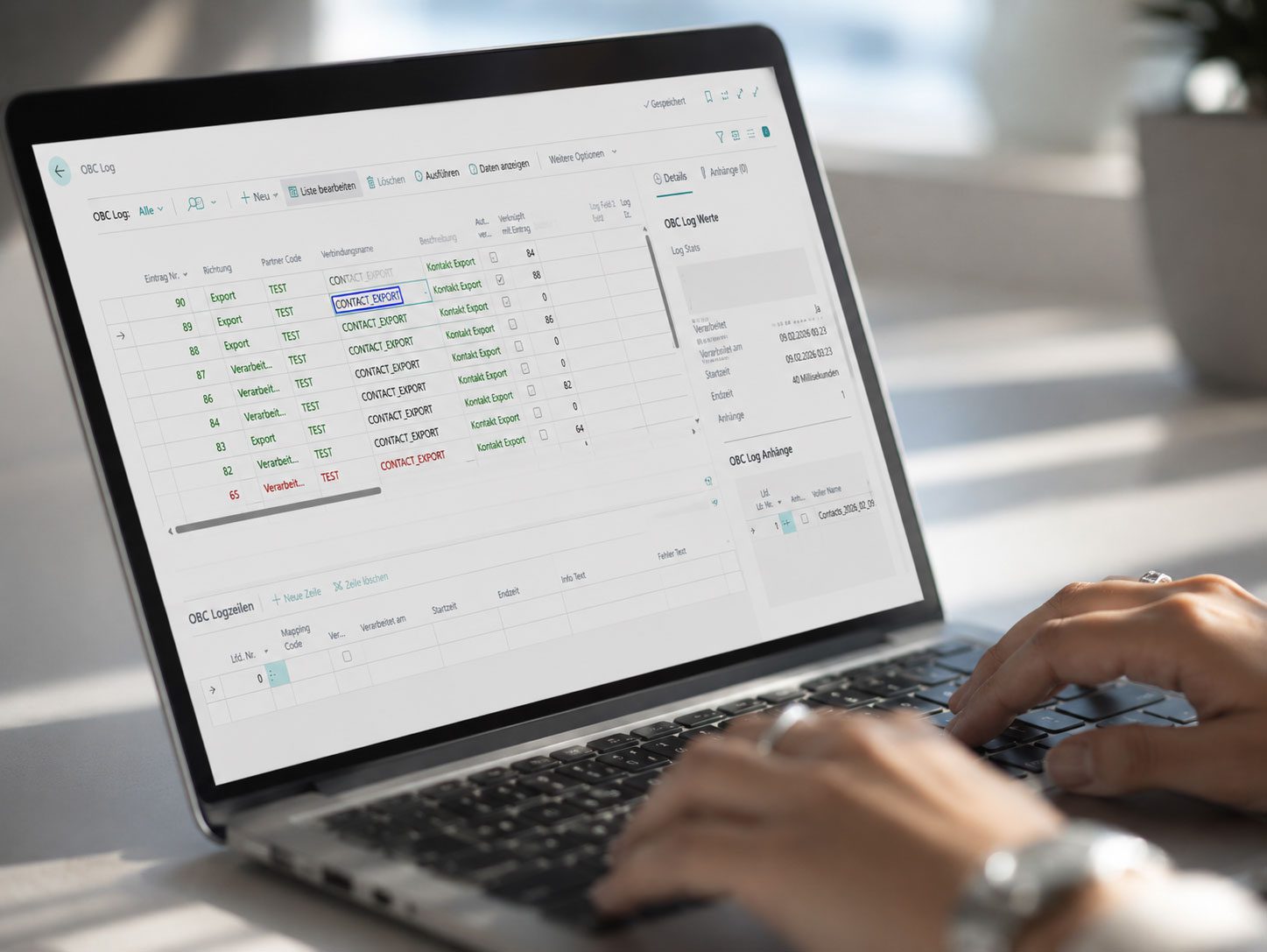
The Interface Cockpit gives you one central place to manage partners, mapping connections, integrations, jobs, logs, and technical setup in Business Central.
This keeps your teams in control where operational work already happens: directly inside Business Central.
The app supports both automated workflows and deliberate manual control. Not every integration should run completely in the background. Some processes need checkpoints, while others should run with as little manual effort as possible.
Integrations with a clear structure
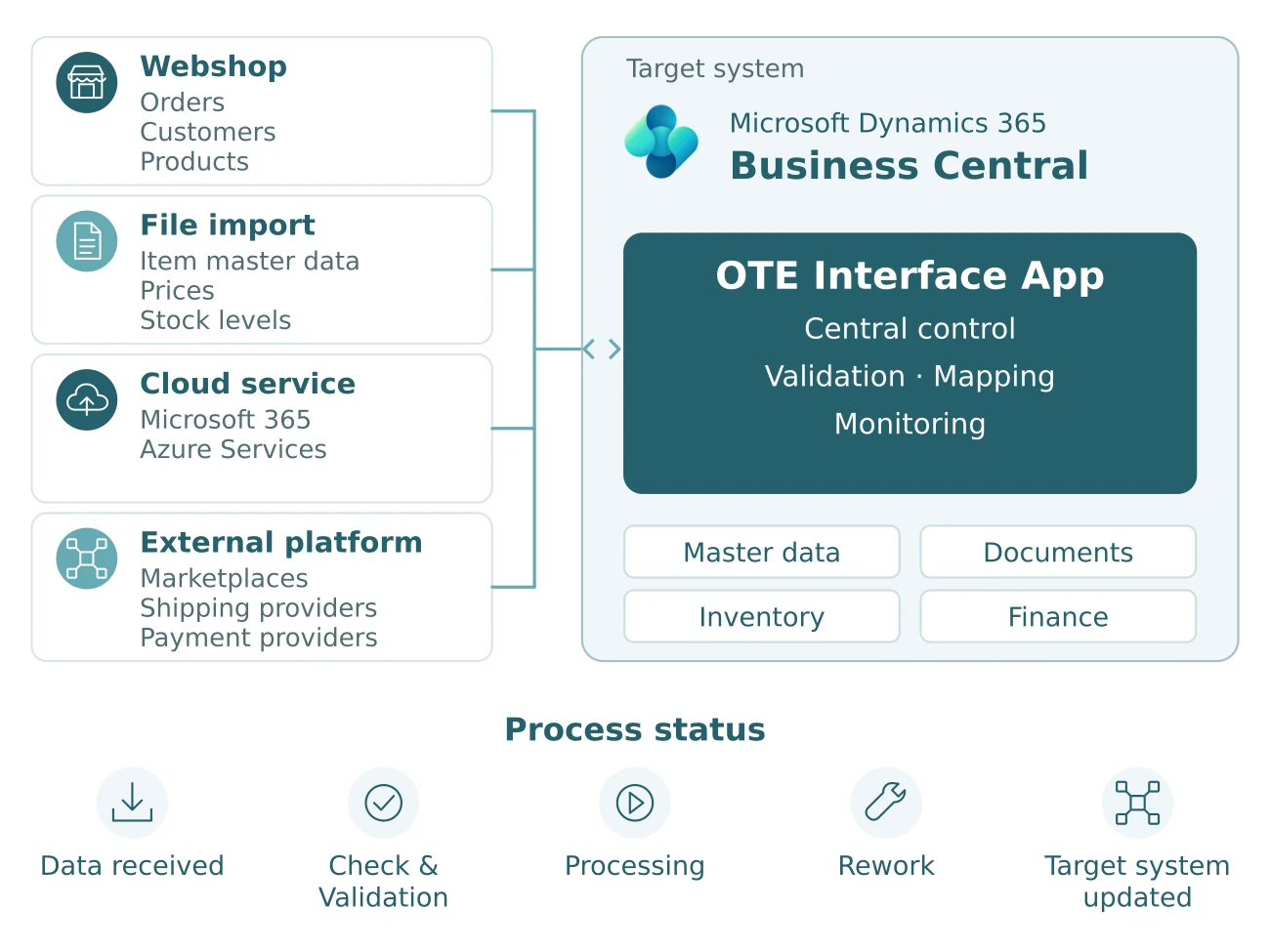
From incoming data to completed processing
For many businesses, the challenge is not the systems themselves, but the interaction between them. Data from webshops, cloud services, platforms, and external files needs to be transferred reliably and integrated into day-to-day operations.
That is where OTE makes the difference. The Interface App provides a centralized framework for recurring integration workflows in Microsoft Dynamics 365 Business Central — transparent, manageable, and aligned with your operational processes.
The infographic illustrates common integration scenarios, including automated file exchange, API integrations, and the processing of master, inventory, and transaction data. The focus goes beyond moving data from one system to another. What matters are reliable processes that support daily operations.
OTE supports companies from initial concept through to ongoing operations. We bring hands-on experience from real integration projects, understand common points of failure, and extend standards where it makes sense — without making processes unnecessarily complex.
Close to the standard. Flexible where it matters. Built to grow with your processes.
Framework for custom integration processes
The framework brings structure to recurring integration processes without limiting flexibility for custom requirements. In Business Central projects especially, integrations rarely work without business-specific adaptations.
Custom fields, customer-specific tables, special validations, and individual follow-up processes can all be handled through extensions. At the same time, developers do not have to start from scratch every time.
This is exactly where the app combines standardization with the flexibility modern ERP projects require.
Who the app is built for
Who benefits from the Interface App?
For businesses looking to keep Business Central integrations under control as their system landscape grows.
Businesses managing several connected systems. Well suited for businesses integrating Business Central with webshops, suppliers, customer systems, platforms, and third-party applications.
Retail and e-commerce businesses Especially relevant for trading and e-commerce companies that want to automate the exchange of orders, deliveries, item master data, and status information.
EDI and automated file exchange. Built for recurring import and export processes with external partners and systems.
Replace disconnected individual integrations. Designed for businesses that want to replace inconsistent individual integrations with a structured central framework.
Common use cases
Manage workflows Integration Data Flows
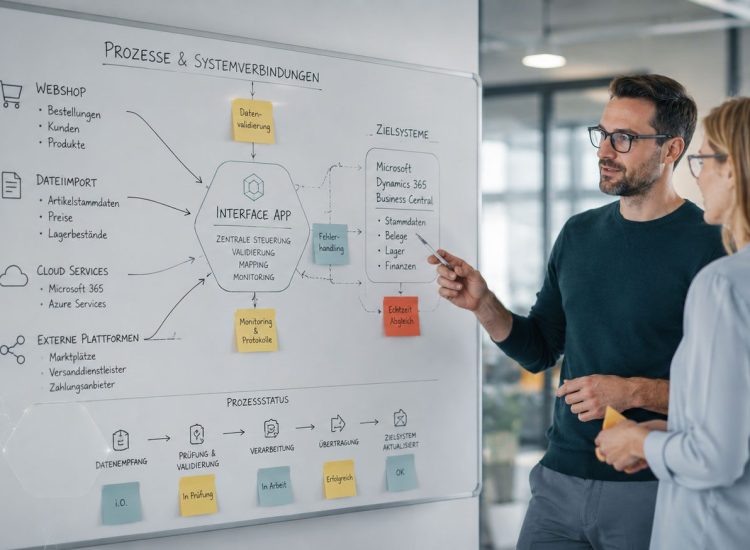
Whether it is a webshop, an EDI process, an API integration, or a traditional file import, the success of many Business Central projects depends not on a single integration, but on how all systems work together.
That is where the OTE Interface App adds structure to growing integration landscapes. In Microsoft Dynamics 365 Business Central, recurring integration processes can be managed centrally, while data imports, exports, processing, and logging remain transparent and easy to control.
Typical use cases range from importing webshop orders and exchanging delivery data to processing files via FTP or connecting external APIs through web requests. Recurring workflows can be automated, errors identified more quickly, and processes monitored centrally.
The result is a stable integration layer for Business Central that fits into a structured and centrally managed system environment.

Transparent processing workflows

Flexible integration of external systems

Automated workflows

Central integration framework
Pricing and getting started
Clear foundation. Flexible implementation.
The OTE Interface App combines a standardized integration framework for Microsoft Dynamics 365 Business Central with the flexibility needed for custom requirements and existing system environments.
Standardized app
The OTE Interface App is licensed as a Business Central app with a monthly subscription for each productive environment.
Companies benefit from a centralized framework for recurring integration processes inside Business Central.
Setup and implementation
Implementation is aligned with your individual interfaces, data structures, and business processes.
The result is a well-structured integration environment that fits smoothly into your existing operational processes.
Custom extensions
Individual extensions such as custom mappings, additional events, or specialized processing logic are possible at any time and implemented according to project requirements.
That way, the app remains adaptable to individual business requirements and future process changes.

We look forward to hearing from you.
Thank you for contacting us.
We will get back to you shortly.
Until then,
Best regards,
Your OTE GmbH Team