
Built for international shipping workflows
exporto Connector
for Business Central
International shipping workflows. Automated customs handling. Seamless ERP integration.
Manage international shipping with structured processes and direct ERP integration. The OTE exporto Connector links Business Central with exporto for automated cross-border operations.
exporto Integration for Business Central
One platform. One connected workflow.
Built for reliable global shipping processes.
International e-commerce opens up significant growth potential. But with every additional market, shipping processes, customs requirements, tax regulations, returns management, and operational visibility become more demanding. Processes that work smoothly at a national level often grow complex internationally.
With exporto, online retailers gain access to an end-to-end solution for European cross-border shipping. The OTE exporto Connector connects this shipping platform directly with Microsoft Dynamics 365 Business Central. This allows international shipments to be managed centrally from within your ERP system while avoiding unnecessary manual steps.
Core features for reliable integrations
What the exporto Connector does for your business:
The connector exchanges relevant shipping and process data between Business Central and exporto. This allows your teams to stay inside Business Central while using a dedicated platform for cross-border shipping, customs handling, and last-mile delivery management.
Deliveries
Deliveries are generated automatically from your existing processes.
Product master data
Product master data is provided directly to exporto.
Shipping Labels
Shipping and return labels can be retrieved directly.
Transparent shipment tracking
Shipping information remains centrally documented and traceable inside the ERP.
Data transfer
Data is transferred seamlessly between Business Central and exporto.
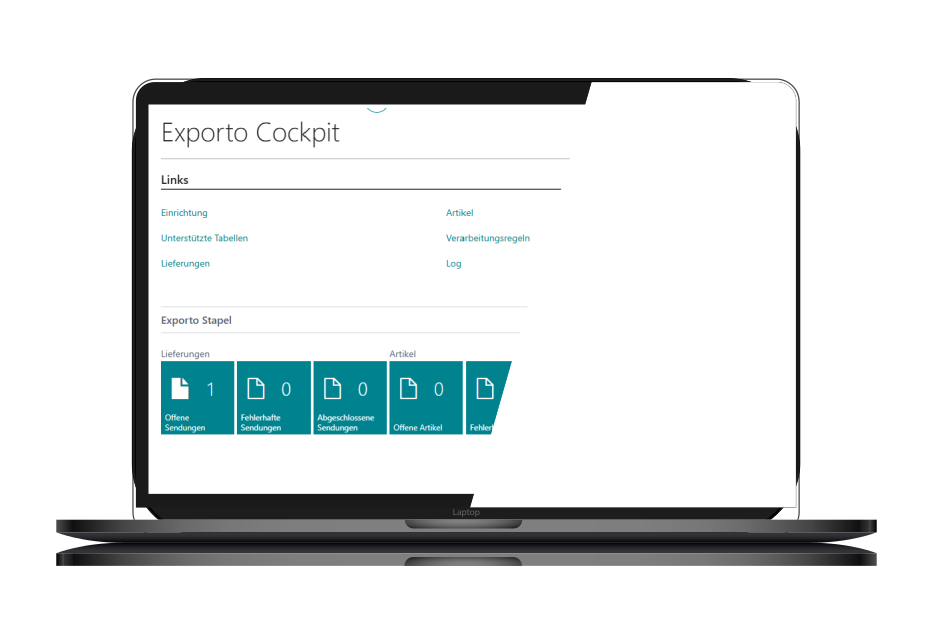
exporto Cockpit
Zentral verbunden.
Prozesse vereinfacht.
Inside Microsoft Business Central, the exporto Cockpit gives you one central place to manage configurations, item data, shipments, and processing workflows. Your teams stay in control directly within the ERP environment.
The app supports both automated workflows and manual control options. This is especially important because not every shipping process works the same way. Some companies want to automate as much as possible, while others require deliberate control points within the process. The connector supports both approaches.

Cross-border shipping with structure
From shipping workflows to full tracking visibility
This is how international shipping works in practice — step by step, directly in Business Central.
Automatic shipment creation
Based on sales orders, posted shipments, or other supported documents, exporto deliveries are generated automatically.
Structured transfer of shipping information
Package information, item lines, and relevant shipping data are prepared and transferred to exporto automatically.
Retrieve shipping and return labels
Before shipments are processed, labels and return labels are retrieved from exporto and connected directly to the appropriate workflows in Microsoft Business Central.
Track shipment status centrally
The current shipment status can be retrieved from exporto and viewed directly inside Business Central.
Automation and extensibility
Standardized foundation. Flexible processes. Ready to scale.
The OTE exporto Connector integrates directly into existing Microsoft Business Central workflows. Processing rules define which records are relevant for exporto, giving companies precise control over when shipments are created automatically.
At the same time, the solution remains fully extensible. If processes, documents, or data logic need to be adapted to individual requirements, OTE implements these extensions based on the existing app structure. This is exactly where we combine our experience as ERP specialists, software developers, and Business Central partners with a practical understanding of how your operations actually work.
Who benefits from the exporto Connector?
Built for e-commerce companies expanding into international markets.
Online retail companies
A strong fit for businesses running Microsoft Dynamics 365 Business Central and looking to manage cross-border shipping within a structured ERP process.
Shipping to Switzerland and across Europe
Especially relevant for retailers shipping to Switzerland or other European markets.
Move away from manual shipping processes
For companies that no longer want to manage cross-border processes manually or across disconnected systems.
Pricing and getting started
Clear and connected integration workflows.
A structured foundation.
Standardized foundation
The OTE exporto Connector is available as a standard connector with a monthly subscription per productive environment — ready to use quickly and with minimal setup effort.
Custom extensions
If required, the connector can be extended with project-specific customizations and additional functionality tailored to your individual business processes.

We look forward to hearing from you.
Thank you for contacting us.
We will get back to you shortly.
Until then,
Best regards,
Your OTE GmbH Team