
Document Capture for Business Central
Digital Invoice Processing
Process incoming invoices intelligently.
Automatically capture invoices. Manage approvals digitally. Archive documents in compliance with audit requirements. Speed up your processes.
With Continia Document Capture, you can digitize your entire incoming invoice process directly in Microsoft Dyna
Continia Document Capture
Digital Invoice Processing – Directly in Business Central
Automatically capture invoices. Manage approvals digitally. Archive documents in compliance with audit requirements. Speed up your processes.
With Continia Document Capture, you can digitize your entire incoming invoice process directly in Microsoft Dynamics 365 Business Central. From automatically capturing incoming invoices and intelligent validation and approval workflows to posting and archiving, everything takes place within your familiar Business Central environment.

Automatic
Document Capture

Digital Approvals

Audit-Compliant Archiving

Fully Integrated with Business Central
Put an End to Manual Invoice Processing
Does This Sound Familiar?
Many businesses still rely on manual processes for incoming invoices, even with a modern ERP system in place. Invoices arrive by email, are printed, forwarded or entered manually. Approvals get buried in email chains or paperwork, information is entered more than once, and documents can be difficult to find later.
The result: unnecessary effort, long processing times and a higher risk of errors.

Perhaps Some of This Sounds Familiar:
Invoices are entered manually in Business Central.
Approvals are handled by email or on paper.
Payment deadlines are unnecessarily stretched or even missed.
No one knows exactly where an invoice is in the approval process.
Finding documents takes too much time.
Employees spend valuable time entering data instead of focusing on higher-value tasks.
With Continia Document Capture, these challenges become a thing of the past. The solution automates incoming invoice processing and gives you transparent, traceable workflows from start to finish.
What Is Document Capture?
Digital Invoice Processing – Directly in Business Central
Continia Document Capture is one of the leading solutions for processing incoming invoices directly within Microsoft Dynamics 365 Business Central. It automatically captures invoice data, identifies vendors and invoice details, suggests posting information and supports the entire approval process through to final posting. And because everything happens directly in Business Central, there is no need to switch between applications. Finance, purchasing and other departments work together in one familiar environment.
Your Benefits at a Glance
More Efficiency. Less Manual Work.
With Continia Document Capture, you can digitise incoming invoice processing directly within Microsoft Dynamics 365 Business Central. Automated workflows reduce manual effort, improve visibility and help your team process invoices faster and more efficiently.
Automatic Document Capture:
Invoice numbers, amounts, vendors, payment terms and other relevant information are automatically recognised and transferred into Business Central.
Intelligent OCR:
Invoice numbers, amounts, vendors, payment terms and other relevant information are automatically recognised and transferred into Business Central.
Digital Approval Workflows
Approval workflows can be tailored to your organisational structure, giving you greater transparency and control throughout the process.
Seamless Integration:
Every step takes place directly within Microsoft Dynamics 365 Business Central. Documents, approvals and postings remain connected within your ERP system.
Compliant Document Archiving:
Original documents remain permanently linked to the corresponding entries and are available whenever you need them – providing transparency and reliable documentation.
Fewer Errors. Faster Processing:
Automated checks and validations reduce data-entry errors. Invoices enter the digital workflow immediately, helping your team process them faster.
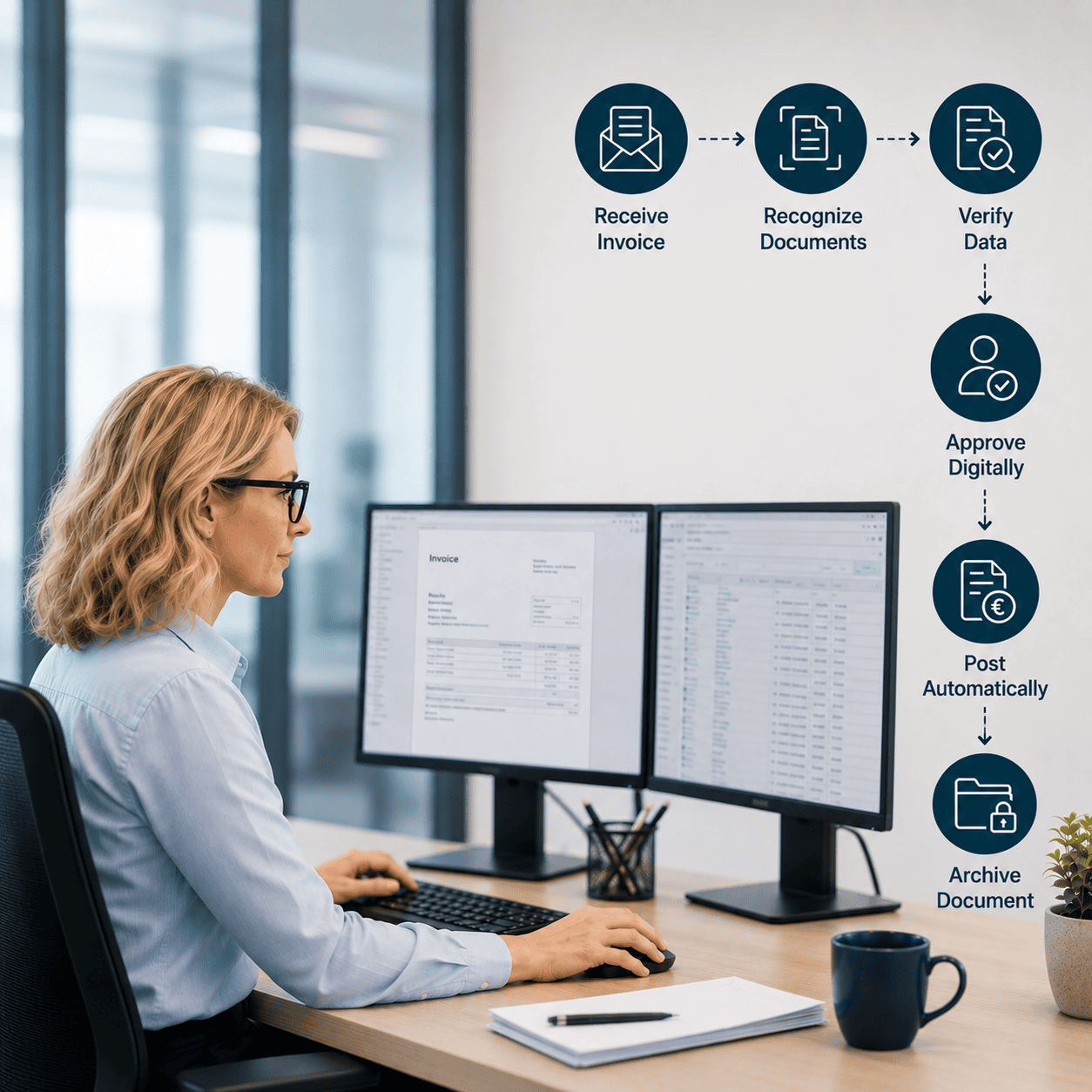
How Document Capture Works
Digital Invoice Processing in Six Steps
From receiving an invoice through to compliant archiving, the entire process takes place directly within Microsoft Dynamics 365 Business Central.
01 Receive Invoice
Invoices arrive by email, scan, PDF or as electronic invoices.
02 Capture Document
Document Capture automatically reads the invoice and extracts the relevant information.
03 Validate Data
The captured information is validated and can be completed or adjusted where necessary.
04 Approve Digitally
The appropriate approval workflow starts automatically based on criteria such as amount, cost centre or organisational unit.
05 Post Directly
Once approved, the invoice can be posted directly in Microsoft Dynamics 365 Business Central.
06 Archive Document
The original invoice remains permanently linked to the corresponding entry and can be accessed whenever needed.
Fully Integrated
Not a Standalone Solution – Part of Your ERP
Our Recommendation
We don’t recommend software simply because it offers the most features. We recommend solutions that have proven themselves in our customers’ day-to-day operations.
Continia has been one of the leading providers of Business Central extensions for many years. Document Capture is used by thousands of businesses worldwide and is continuously developed and improved.
Its deep integration with Business Central, proven stability and ease of use are why we have relied on Continia Document Capture at OTE for many years.
Document Capture was built specifically for Microsoft Dynamics 365 Business Central.
What This Means for You:
- No duplicate master data maintenance.
No synchronisation between separate applications.
No additional interfaces for your users.
Your employees continue working where they already work every day – directly in Business Central.
That means less training, faster adoption and smoother day-to-day processes.
Why OTE?
Great Software Needs Great Processes.
Powerful software delivers its full value only when it fits the way your business actually works.
As a Microsoft Dynamics 365 Business Central partner, we have been helping companies digitise and optimise their finance and document processes for many years.
We don’t just look at the software. We look at the entire process.
Document Capture Implementation
We help you implement Document Capture efficiently and tailor it to your business processes.
Invoice Process Analysis & Optimisation
Together, we analyse your existing invoice process and identify practical opportunities for improvement.
Approval Workflow Setup
We configure approval workflows around your organisational structure, responsibilities and business rules.
Business Process Integration
Document Capture is seamlessly integrated into your existing business processes.
User Training
We support your employees throughout the implementation and make sure they can use the solution confidently in their day-to-day work.
Accounts Payable Optimisation
Our goal isn’t simply to install software. It’s to make your incoming invoice process measurably more efficient.
Business Central Extensions
And when you need to extend your Business Central environment further, we’re here to help.
Why We Choose Continia
Proven Technology for Business Central
We recommend solutions that work in practice – not simply those with the longest feature lists. Continia has been one of the leading providers of Business Central extensions for many years. Document Capture is used by thousands of businesses worldwide and is continuously developed and improved. Its deep integration with Business Central, proven stability and ease of use are why we have relied on Continia Document Capture at OTE for many years.
Proven in Practice

Leading Provider

Seamless Integration

Easy to Use
Typical Use Cases
More Than Incoming Invoices
Document Capture supports a wide range of document processes, evolving from a traditional OCR solution into a central platform for digital document processing. It can process many different document types digitally, including:
Incoming Invoices
Credit Notes
Delivery Notes
Purchase Orders
Contract Docs
E-Invoices
Digitalisation for Businesses of All Sizes
Who Is Document Capture For?
Document Capture is particularly valuable for businesses that process large volumes of documents and want to reduce manual work. Wholesalers, retailers, manufacturers and service providers can achieve significant time and cost savings through automated document processing.
Streamline Invoice Processing
For businesses that regularly process incoming invoices and want to reduce manual data entry.
Digitise Finance Processes
For businesses looking to digitise approvals, maintain compliant documentation and make their finance processes more efficient.
Get More from Business Central
For businesses already using Microsoft Dynamics 365 Business Central – or planning to implement it.
You Ask. We Answer.
FAQs
Can Document Capture Process E-Invoices?
Yes. In addition to traditional PDF invoices, Document Capture supports modern electronic invoice formats and processes them directly within Microsoft Dynamics 365 Business Central.
Is OCR Already Built In?
Yes. Invoice data is automatically recognised and extracted, then prepared for further processing and posting.
Can Approval Workflows Be Customised?
Yes. Approval workflows can be tailored to your organisational structure, approval limits and individual responsibilities.
Can We Continue Using Our Existing Business Central Processes?
Yes. Document Capture extends Microsoft Dynamics 365 Business Central and integrates seamlessly into your existing processes without disrupting established workflows.
Does Document Capture Work with Business Central Online?
Yes. Document Capture supports Microsoft Dynamics 365 Business Central Online as well as supported on-premises environments.
Do We Need to Maintain Master Data Twice?
No. Document Capture uses the master data already available in Microsoft Dynamics 365 Business Central, so there is no need for duplicate data maintenance.
Do Documents Remain Linked to Their Entries?
Yes. Original documents remain permanently linked to the corresponding entries and can be accessed directly from Business Central whenever needed.
Let's Digitise Your Invoice Process.
In a no-obligation demo, we'll show you how to:
- Save Time: Automatically capture and process incoming invoices.
- Speed Up Processes: Manage approval workflows digitally – from anywhere.
- Stay Compliant: Archive documents securely and in compliance with regulatory requirements.
- Work Seamlessly: Integrate Document Capture directly into Business Central.
Together, we'll analyse your processes and identify practical opportunities for improvement.
Talk to our Business Central experts – we'd be happy to advise you personally.

We look forward to hearing from you.
Thank you for contacting us.
We will get back to you shortly.
Until then,
Best regards,
Your OTE GmbH Team